
Server config reference
Use Config to edit common DayZ server settings through grouped fields. Raw config gives experienced admins access to the full configuration when their service allows it. The panel uses JSON, which differs from the native serverDZ.cfg syntax. For file-based self-hosting, follow Configure a DayZ server.
Bohemia Interactive’s official DayZ server configuration reference documents the game’s limits and behavior.
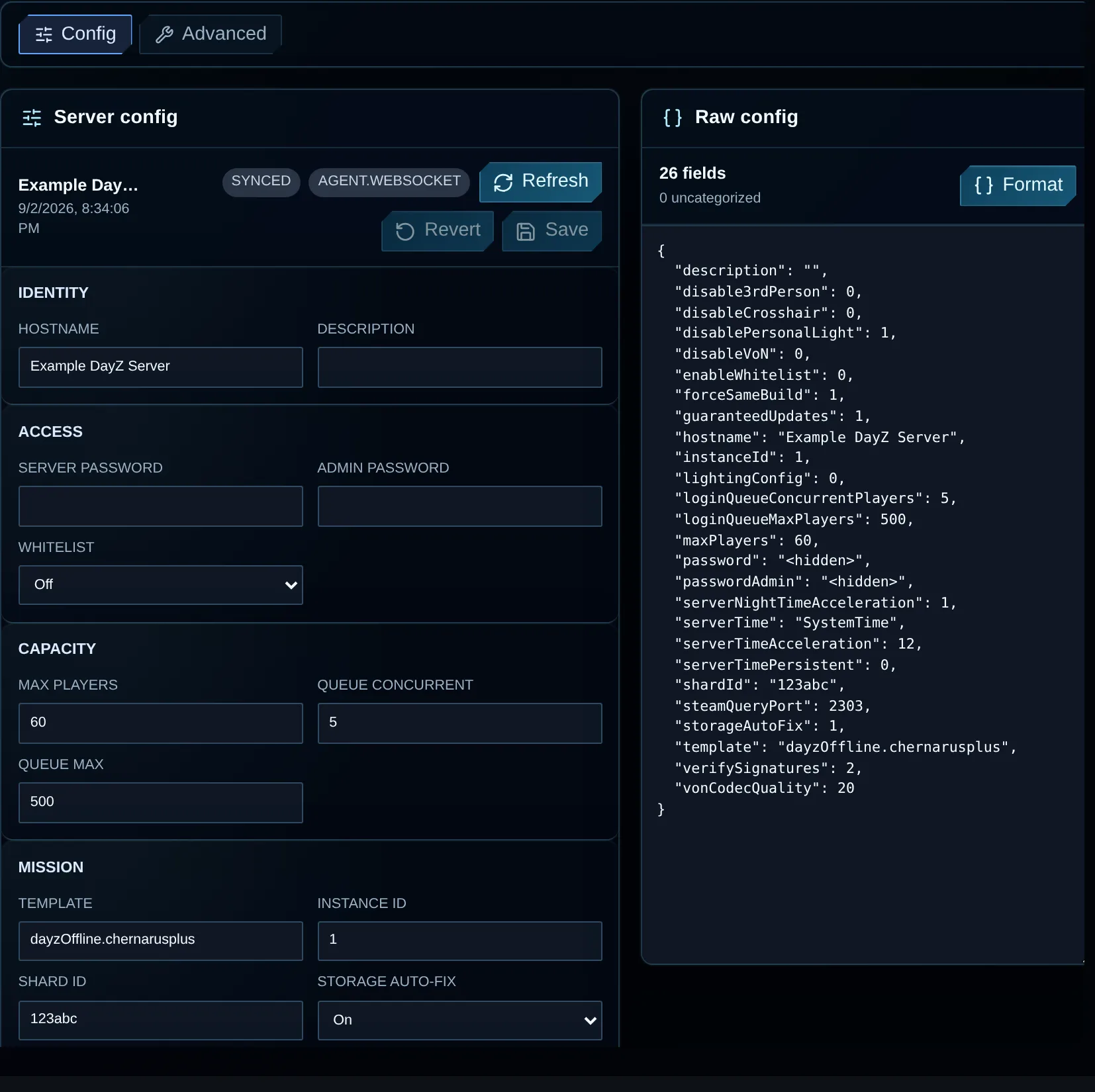
Use the grouped controls for routine edits. Secret values are replaced with <hidden> in this screenshot. Never share your own Raw config secrets.
Save a configuration change
Section titled “Save a configuration change”- Choose the intended server, open Configuration and select Config.
- Press Refresh, then wait until the form says
Synced. - Edit the fields needed for your change.
- Check for
Unsavedand inspect any raw-config validation error. - Press Save and wait for confirmation of success.
- If the setting requires a restart, use Console.
- Check the result in Logs and the server browser.
Revert drops your draft and restores the last loaded values. Refresh reads the server file again, so check for another operator’s saved work before using it.
Identity
Section titled “Identity”| Field | Config key | Meaning |
|---|---|---|
| Hostname | hostname |
The name players see in the DayZ browser. Choose one they can recognize. |
| Description | description |
Browser description visible to players, limited by DayZ to 255 characters. |
Access
Section titled “Access”| Field | Config key | Meaning |
|---|---|---|
| Server password | password |
The password required to join. Leave it blank for a public server only. |
| Admin password | passwordAdmin |
Authenticates an in-game server administrator. Use a different value from account and RCON passwords. |
| Whitelist | enableWhitelist |
Restricts joins to players in the server whitelist when enabled. Prepare that file before turning this on. |
Password changes generally need a server restart. Test the new join password with a fresh connection; it won’t be checked again for players who are already connected.
Capacity
Section titled “Capacity”| Field | Config key | Meaning |
|---|---|---|
| Max players | maxPlayers |
The player-slot cap. Increasing it adds potential CPU, memory, network and mod workload, and plan limits may apply. |
| Queue concurrent | loginQueueConcurrentPlayers |
How many queued players can log in at once. A lower value limits connection bursts but can slow entry if set too low. |
| Queue max | loginQueueMaxPlayers |
The largest number of players permitted in the login queue. |
Mission
Section titled “Mission”| Field | Config key | Meaning |
|---|---|---|
| Template | template |
The mission and terrain to load at startup, often written as mission.terrain, such as dayzOffline.chernarusplus. Its mission folder must exist. |
| Instance ID | instanceId |
A numeric DayZ instance identifier separating storage and persistence on the host. On a live server, change it only when you intend to select another storage set. |
| Shard ID | shardId |
The shard/hive identifier in server configuration. Retain the assigned value unless the migration procedure requires changing it. |
| Storage auto-fix | storageAutoFix |
Allows DayZ to detect corrupt persistence files and replace them with empty files. Retain verified backups: a replacement loses data even if startup then succeeds. |
| Field | Config key | Meaning |
|---|---|---|
| Server time | serverTime |
The initial game time. Set SystemTime for host time or provide a supported date/time such as 2015/4/8/17/23. |
| Day acceleration | serverTimeAcceleration |
Multiplies game time. With Night acceleration set to 1, 1 follows real time and 24 completes a 24-hour game cycle in about a real hour. A different night multiplier changes the full-cycle duration. The documented DayZ range is 0.1–64. |
| Night acceleration | serverNightTimeAcceleration |
Multiplies Day acceleration during night. Day 2 with night 4 gives 8× at night. The documented range is 0.1–64. |
| Persistent time | serverTimePersistent |
Stores the game time and continues from it after a restart, instead of reapplying the initial time. |
Gameplay
Section titled “Gameplay”| Field | Config key | Meaning |
|---|---|---|
| Disable 3rd person | disable3rdPerson |
Enabling this prevents third-person camera use. |
| Disable crosshair | disableCrosshair |
Enabling this hides the default on-screen crosshair. |
| Disable personal light | disablePersonalLight |
Enabling this removes the built-in light surrounding players at night. |
| Lighting config | lightingConfig |
Selects a night-light preset: 0 for brighter, 1 for darker and 2 for Sakhal-specific lighting. An enabled gameplay JSON file can override this value. |
Network and security
Section titled “Network and security”| Field | Config key | Meaning |
|---|---|---|
| Steam query port | steamQueryPort |
Steam browser queries use this port. Match the assigned network plan and avoid conflicts with other services. |
| Verify signatures | verifySignatures |
Checks mod PBO files against approved signature keys. DayZ supports 2; reduced or disabled verification weakens those checks. |
| Force same build | forceSameBuild |
When enabled, accepts clients sharing the server’s executable revision and rejects version mismatches. |
| Guaranteed updates | guaranteedUpdates |
Controls DayZ game-server communication protocol. Keep the assigned value; Bohemia documents 1. |
| Disable VoN | disableVoN |
Turns off in-game Voice over Network when enabled. |
| VoN codec quality | vonCodecQuality |
Accepts 0 through 20. Higher voice quality can require more bandwidth. |
| Log file | logFile |
Names the saved console-output file in the profile/log directory, for example server_console.log. |
Editing a port leaves player bookmarks, RCON tools, launch parameters and external filtering unchanged. Read Server address and ports and contact support before altering an assigned port.
Raw config
Section titled “Raw config”Raw config presents the full configuration as a JSON object. It counts the fields and identifies keys omitted from the grouped form.
Where your policy allows editing, choose either method:
- Grouped fields (recommended): constrained inputs help prevent typing and structure errors.
- Raw config: edit or retain uncommon keys, with access to the whole document in one operation.
Format parses the draft and indents its JSON without saving it. Fix parsing errors before saving, then check the mission path and whether DayZ supports the values you entered. Restart when required, inspect the logs and test the changed behavior, including player joins. JSON parsing checks the structure, not those game conditions.
This three-field fragment illustrates values only. Keep the rest of your loaded configuration when editing; do not replace the full document with this fragment or paste it into a native serverDZ.cfg:
{ "hostname": "My DayZ server", "maxPlayers": 60, "enableWhitelist": 0}Common problems
Section titled “Common problems”| Problem | Check |
|---|---|
| Save stays disabled | Change a value and fix any raw JSON errors. Your service may also restrict the field to read-only access. |
| Server will not start | Undo the latest edit and check the final RPT lines, mission template, ports and JSON value types. |
| Server disappeared from browser | Verify state, Steam query port, query filtering and matching builds. |
| Players cannot join after access change | Verify the password, whitelist, signatures, build and mod versions. |
| Time moves unexpectedly | Multiply the day and night acceleration values to calculate the effective night speed. |